
iSCSI Security in VMware
Fibre channel seems to be losing its popularity and more people are turning to iSCSI as the block storage protocol of choice. If you don’t already have an FC fabric then why introduce that into your design now. So when choosing to use iSCSI for storage connectivity or any other storage protocol then you’ll have to take security into consideration when performing an implementation.
Security is a pillar of infrastructure design qualities in which every system should be properly designed from its inception. Depending on the data or system you’re trying to protect then the protection mechanism should be proportion to the criticality or importance to the organization. To secure your SAN you should:
- Assess configurations
- Test secure mechanism effectiveness
- Identify holes
- Quantify risks
- Implement practical security solutions for high risk exposures
The EMC article titled “Building Secure SANs” has a nice table illustrating the different security categories and the mechanism to protect it. I’ll just should the IP SAN section:
| Security Category | IP SAN Mechanisms | VMware Supported |
| Availability | QoS | Yes, also SIOC and NIOC |
| Authentication | CHAP
KBR RADIUS TACACS+ Kerberos SRP |
Yes
No No No No No |
| Authorization | iSCN
LUN Masking VLAN Tagging Port controls |
No
Yes Yes Yes |
| Auditing | ACL
SSH SSL |
Yes |
| Encryption | IPSec
In-transit Algorithms At-rest Algorithms |
No |
| Integrity | IPSec (AH)
MD5 hash SHA-1 hash |
No |
Security should be used in a multi prong approach with protection at multiple levels. By enforcing good security standards and principles you can have a network that can help in mitigating your risks to vulnerabilities in your iSCSI storage.
References:
- Building Secure SANs: https://www.emc.com/collateral/hardware/technical-documentation/h8082-building-secure-sans-tb.pdf
- VMware Documentation: Protecting an iSCSI SAN: https://pubs.vmware.com/vsphere-60/index.jsp#com.vmware.vcli.examples.doc/cli_manage_iscsi_storage.7.3.html
- VMware Best Practices for Running VMware vSphere on iSCSI: http://www.vmware.com/files/pdf/iSCSI_design_deploy.pdf
CCDA Study: What is PPDIOO?
Studying for CCDA: What is PPDIOO?
I’ve been studying for the Cisco Certified Design Associate (CCDA) to give me a better insight and view of the Cisco design methodology. I’m trying to be well rounded overall and this is one of weaker areas. It’s been interesting and I’m learning a lot in the way of how Cisco sees the building blocks for a network design.
I came across the acronym PPDIOO which stands for Prepare, Plan, Design, Implement, Operate, and Optimize.
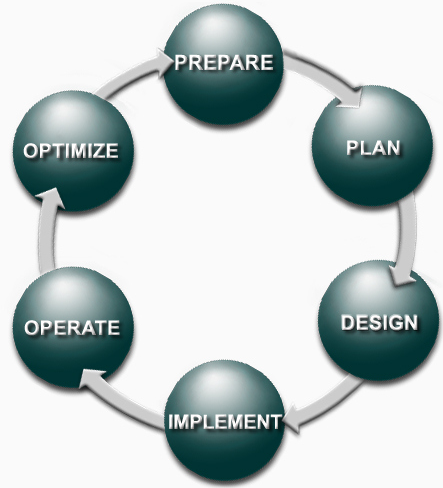
This is the network lifecyle. Each phase builds up to the next phase and provides a roadmap of how a network should be implemented, designed and upgraded.
| PPDIOO Phase | Description |
| Prepare | Establishes organizational and business requirements, develops a network strategy, and proposes a high-level architecture |
| Plan | Identifies the network requirements by characterizing and assessing the network, performing a gap analysis |
| Design | Provides high availability, reliability, security, scalability, and performance |
| Implement | Installation and configuration of new equipment |
| Operate | Day-to-day network operations |
| Optimize | Proactive network management; modifications to the design |
These different phases sound very familiar and match up to other design frameworks, ontologies or methodologies. But they all have a central focus on logically breaking down each step to provide a repeatable process in which all points are thought out.
 Digital4n6.me