
Enable VMware EVC by default on your new vSphere Clusters
If you don’t have a compelling reason to not enable EVC on a cluster, then I don’t see why you wouldn’t enable it. EVC allows you to future guard your cluster so that it allows you to introduce different CPU generations on a cluster.
There has been no evidence that EVC negatively impacts performance. But like with anything you should trust, but verify the application workload has the acceptable level of performance that is required.
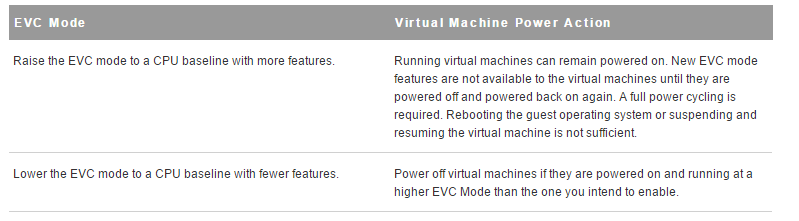
There are impacts as to whether you have enabled EVC on an already existing vSphere cluster with running VMs. There is no outage if you do decide to turn on EVC on an existing cluster, but running VMs will not be able to take advantage of new CPU features until the VM is powered off and powered back on again. The opposite will occur if you decide to lower the EVC on an already EVC enabled cluster so the VM will be running at a higher EVC mode than the one that was explicitly lowered to until the VM is powered off and powered back on.
References:
- VMware KB: EVC and CPU Compatibility FAQ (1005764):
- Derek Seaman’s Blog: How much does VMware EVC mode matter? Which one?:
- VMware Technical White Paper: Impact of Enhanced vMotion Compatibility on Application Perfromance:
- Frank Denneman’s Blog: Enhanced vMotion Compatibility:
vSphere Cluster Size
I’ve pondered over this question before, “how big should I make my cluster”. At that point you have to take a step back and think about the tradeoffs with the potential impacts that your next decision is going to bring.
So you have a design decision: Should you design a vertical or horizontal vSphere HA cluster?
At this point you have some design choices to make. Let’s assume that you have an already established cluster of 5 nodes with HA and DRS enabled. There is money in the budget to buy additional servers to accommodate future growth.
There is a considerable amount of information in order for you to consider in order to make the most appropriate decision, such as cost, power, cooling, floor space and max cluster limitations to name a few. There are advantages and disadvantages to designing a vertical or horizontal cluster.
Scale-up cluster
| Advantage | Disadvantage |
| Managing fewer host reduces administrative cost | HA failover potential takes longer to complete |
| Less hardware to provide redundancy vice splitting the cluster in two and needing more host for failover | Need to be careful to stay within the cluster VM pert Host maximums. Potentially resulting in VMs not being restarted after a failure. |
| More cluster resources reserved for failure | |
| For DRS, fewer migration choices available to balance out the cluster | |
| Patching large clusters can take longer |
Scale-out cluster
| Advantage | Disadvantage |
| A host failure affects fewer VMs | Potential affects the maximum size that a VM can be configured |
| HA failover takes less time | More data center floor space |
| Fewer resources reserved for failover | Increase costs, i.e. power, cooling |
| Less of a concern with staying within the cluster VM per Host maximums | |
| For DRS, it provides a greater migration choice and more opportunities for a better workload balance |
On top of these advantages/disadvantages then you have to decide if your current design is meeting the demand of the business to achieve the performance, scalability and the return on investments. Gathering a current state assessment will aid the decision making process to guide you towards a design. Getting back to the scenario above it definitely depends on a multitude of factors, but if you can identify all of these different interdependencies. There is not enough information to make a decision up front, but you can start to formalize a game plan to get you in the right direction.
With these choices being taken into account, then one must decide whether you’re meeting the requirement of the business needs. I definitely enjoy making those decisions and figuring out the best possible solution available.
Useful resources
- There is a nice vSphere Cluster Sizing Calculator by @josh_odgers which allows you to do a quick calculation
- VMware vSphere Design 2nd Edition by Forbes Guthrie, Scott Lowe and Kendrick Coleman
- VMware Design Workshop course
 Digital4n6.me