
AWS Regions and Availability Zones
Every IT architect strives to deliver an optimized and cost effective solution to their customer. Therefore, they must be able to explain and understand the different options that a customer has to then assist them in choosing the best option possible taking the trade-offs into account. There is a mutual partnership relationship between the architect and the customer that is ongoing in order to produce a quality output deliverable.
Amazon AWS infrastructure is broken up by regions and availability zones. They continue to expand their infrastructure constantly as their business grows. So what is a region, a region is a named set of AWS resources in the same separate geographic area. AWS provides you with a choice of different regions around the world in order to help customers meet their requirements. Each region is completely isolated from the other regions.
There are only a set number of available regions to choose from when but as the customers grow, then AWS will continue to provide the infrastructure that meets the global requirements. In North America AWS has 3 regions to choose from and a GovCloud region:
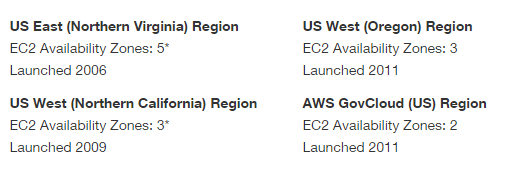
Inside of these regions, there are Availability Zones. These are basically AWS data centers within these regions that are connected to each AZ in the region via low latency links.
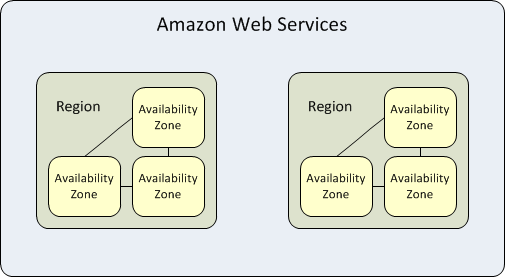
Availability zones allows you to architect your applications to be as resilient as possible by separating them out as failure domains so that there is not a single point of failure. As with all architects, we must design architectures that assumes that things will fail.
With the implementation of Auto-Scaling, ELBs and multiple Availability Zones then you can build a reliable architecture that takes only minutes to setup instead of days and weeks. I’ll go over Auto-Scaling and ELBs on a separate post.
Resources:
- Regions and Availability Zones: http://docs.aws.amazon.com/AWSEC2/latest/UserGuide/using-regions-availability-zones.html
- AWS Global Infrastructure: http://aws.amazon.com/about-aws/global-infrastructure/
AWS Certified Solutions Architect – Associate Level
I saw this challenge from Virtualization Design Masters (VDM) to write 30 blog postings in 30 days. I’m going into this with the intention of being able to do this since I’ve been meaning to post more blog postings and it might even get me into the habit of posting regularly. I don’t want to post for the sake of posting since I feel like that adds no value so I have my list of topics that I’m currently working on right now so I feel prepared.
So I decided to tackle the Amazon certification for AWS Certified Solutions Architect – Associate Level. I’m planning on taking it at the end of the month, hopefully if everything works out. I’ve been meaning to learn more about AWS for a long time now, but I think now is the time, especially since it’s only going to get more popular.
The exam is a multiple choice exam covering four different domains:
| Domain | % of Examination |
| 1.0 Designing highly available, cost efficient, fault tolerant, scalable systems | 60% |
| 2.0 Implementation/Deployment | 10% |
| 3.0 Data Security | 20% |
| 4.0 Troubleshooting | 10% |
| TOTAL | 100% |
So obviously the first domain is the biggest bang for your buck when it comes to scheduling your studying time. This section also fits very nicely with my other work responsibilities and other certifications that I have my eye on, namely the illusive VCDX. I’ve started by signing up for the free 12 month AWS account to use as my lab so that I can try different things that I haven’t done so far like Amazon Aurora which is a relational database engine.
I’ve started by reviewing the exam blueprint and getting familiar with it. Amazon does a good job on documentation so their user guides are very useful and easy to understand. They really make it easy to consume their services and also offer self-paced labs via qwiklabs.com to help with your studying. I’ve only done the free labs there and they were good to get your feet wet.
Inside of my free AWS account I’ve been playing a lot with setting up Virtual Private Clouds (VPC) and the different layers of security that you can apply. A good image from the AWS user guide is the security in your VPC:
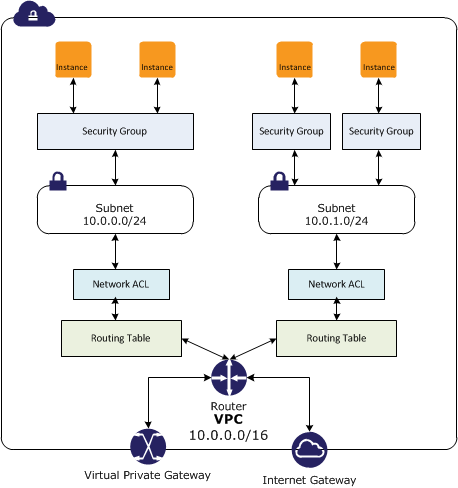
I really like easy to understand things that are broken down with good explanations, did I already say that AWS user guides are well written. 🙂
Below are my resources that I’m currently using for my studying.
Resources:
- AWS Certified Solutions Architect Blueprint: https://aws.amazon.com/certification/certified-solutions-architect-associate/
- Amazon VPC Concepts: http://docs.aws.amazon.com/AmazonVPC/latest/UserGuide/VPC_Introduction.html
- AWS re:Invent videos: https://www.youtube.com/watch?v=SG1DsYgeGEk
Troubleshooting Random Slowness with VMs
Sometimes you’ll come to the question that comes up quite often and that is when user’s complain about slowness on their VMs. Of course the first thing that we do is try to isolate the problem.
So we go through our troubleshooting steps:
- Define the problem
- Gather detailed information
- Consider probable cause for the failure
- Devise a plan to solve the problem
- Implement the plan
- Observe the results of the implementation
- Repeat the process if the plan doesn’t resolve the problem
- Document
For VM slowness issues, then we want to identify the exact nature of the problem. Identifying which VMs are experiencing this slowness issue and if they’re all on the same host will help to isolate any issues. First, find out if there were any recent changes that would correlate with the slowness issue. Then I like to rule out any issues with networking so you can ping the VM, even though this might not be conclusive due to the VM not responding even when there is no networking problem.
You then want to find out if other VMs are experiencing the same problem and if so, then what is the commonality with all of them. If you can rule out the networking portion then you want to tackle getting more details on the storage. The next thing would be to figure out the type of storage array backing those VMs whether it is an active/active or active/passive, ALUA.
Using esxtop to identify certain statistic thresholds like DAVG, KAVG, QAVG, and GAVG is a great way to further pinpoint where performance degradation is happening.
- High DAVG indicates a performance issue on the storage array or somewhere along the path to it.
- High KAVG indicates a performance issue within the VMkernel. Possible causes could include queuing, drivers, etc..
- High QAVG indicates a performance issue is causing queue latency to go up. This could be an indicator of underperforming storage if higher DAVG numbers are experienced as well.
- High GAVG is normally the total of the three previous counters. If experiencing high GAVG while other latency metrics seem sufficient, the issue could reside within the VM drivers or virtual hardware.
Along with the above steps then you also want to verify that your storage array is handling the demand from the VMs.
A lot of this information can be found in different resources online. But I like to have a tried and true script that I can work off when doing performance troubleshooting.
- The book “Troubleshooting vSphere Storage” by Mike Preston (@mwpreston) is a great resource,
- The book “VMware vSphere Performance – Designing CPU, Memory, Storage, and Networking for Performance-Intensive Workloads” by Matt Liebowitz (@mattliebowitz), Christopher Kusek (@cxi), and Rynardt Spies (@rynardtspies)
- Also can’t forget the Performance Best Practices for VMware vSphere 5.5 (I’m not on 6… yet!)
My VCAP-DCD Experience
I took the VCAP-DCD exam today and have finally passed. I believe this is one of the unwritten rule that you have to write about your experience so you can share it. I felt like I just tackled a mountain. This was probably one of the hardest exams that I’ve taken in a long time. This was my second attempt at this beast as my first attempt was at VMworld 2014. I’ve been studying off and on for some time now, but after reading some of the other blogs about guys passing this exam on multiple tries I decided what better time than now to take this challenge on. The blog I read was Craig Waiters who passed it on his third attempt; read his journey here.
I did find the 5.5 version has a lot better flow, then the 5.1 exam. I had 42 questions and 8 were the visio-like design questions. After being unsuccessful the first time, I decided I needed to brush up on high level holistic helicopter view of design. I also did some brushing up on PMP skills to help define requirements, assumptions, contraints, and risks.
In preparation for my take two of this exam I used this:
- On-line practice exam http://www.virtualtiers.net I believe it was created by Jason Grierson. The study pack at the end can in very handy also. This site was very useful and it’s just like the VMware community to make something like this for everyone’s benefit.
- VMware vSphere Design book from Forbes Guthrie, Scott Lowe, and Kendrick Coleman
- The blueprint
Tips:
- I skipped all the questions by flagging them which allowed me to concentrate on the design scenarios while I was still fresh. This left me over an hour and a half left to answer the rest of the questions.
- Know how to apply the infrastructure design qualities of AMPRS: Availability, Manageability, Performance, Recoverability, and Security (Cost can also be thrown in there)
- Requirements, Assumptions, Constraints, and Risks; how to identify these.
- Applying dependencies; upstream and downstream; Good blog by vBikerblog on this Application Dependency – Upstream and Downstream Definitions
- Conceptual, Logical, and Physical designs.
- Storage design best practices; (ALUA, VAAI, VASA, SIOC)
What’s next:
- I’ll be taking the Install,Configure, and Manage (ICM) course for NSX and likely taking the VCP-NV
- Maybe next year I’ll tackle the behemoth of the VCDX; need to finish grad school first
Resource pools, child pools, and who gets what…
I know there have been numerous blog posting on this topic already which are all very good, but this is mainly for my own understanding as I try to understand this topic a bit further.
So what are resource pools?
They are a logical abstraction for management so you can delegate control over the resources of a host (or a cluster). They can be grouped into hierarchies and used to progressively segment out accessible CPU and memory resources.
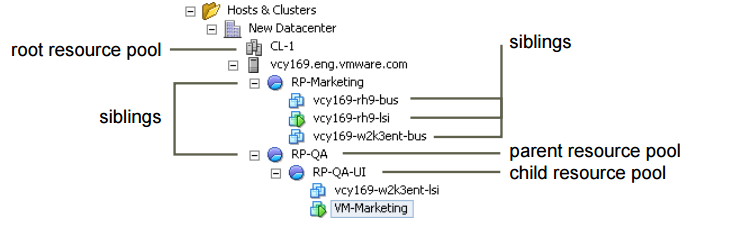
Resource pools use a construct called shares to deal with possible contention (noisy neighbor syndrome)
| Setting | CPU share values | Memory share values |
| High | 2000 shares per vCPU | 20 shares per megabyte of configured VM memory |
| Normal | 1000 shares per vCPU | 10 shares per megabyte of configure VM memory |
| Low | 500 shares per vCPU | 5 shares per megabyte of configured VM memory |
*Taken from the 5.5 vSphere Resource Management document
My biggest issue with even getting into any contention issues is why would you architect a design that has the possibility to have contention if you can avoid it. I understand that a good design takes into account for the worst case scenario in which all VMs would be running at 100% of provisioned resources, therefore possibly generating an over-commitment issue with potential contention but that’s when you go to the business to request more funds for more resources. I know it’s the one of the benefits of virtualization that you can do this, but should you rely on it?.. It’s also a comfort level of over allocation in which the level depends on the individual architect. Keep to the rule of protecting the workload and I don’t see an issue with this. I keep the worst case scenario in mind, but I don’t ever want to get there, but this is more of a rant than anything else.
Frank Denneman(@FrankDenneman), Rawlinson Rivera(@PunchingClouds), Duncan Epping(@DuncanYB) and Chris Wahl(@ChrisWahl) have already set us straight on the impacts of using resource pools incorrectly and the best ways to most efficiently use RPs.
The main takeaways of resource pools are:
- Don’t use them as folders for VMs
- Don’t have VMs on the same level as resource pools without understanding the impacts
- If VMs are added to the resource pools after the shares have been set, then you’ll need to update those share values
- Don’t go over eight (8) levels deep [RP limitation; and why would you]
Additional Resources:
Chris Wahl: Understanding Resource Pools in VMware vSphere
Frank Denneman and Rawlinson Rivera: VMworld 2012 Session VSP1683: VMware vSphere Cluster Resource Pools Best Practices
Duncan Epping: Shares set on Resource Pools
CCDA Study: What is PPDIOO?
Studying for CCDA: What is PPDIOO?
I’ve been studying for the Cisco Certified Design Associate (CCDA) to give me a better insight and view of the Cisco design methodology. I’m trying to be well rounded overall and this is one of weaker areas. It’s been interesting and I’m learning a lot in the way of how Cisco sees the building blocks for a network design.
I came across the acronym PPDIOO which stands for Prepare, Plan, Design, Implement, Operate, and Optimize.
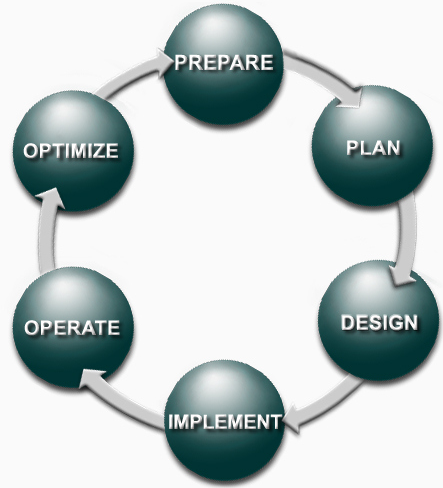
This is the network lifecyle. Each phase builds up to the next phase and provides a roadmap of how a network should be implemented, designed and upgraded.
| PPDIOO Phase | Description |
| Prepare | Establishes organizational and business requirements, develops a network strategy, and proposes a high-level architecture |
| Plan | Identifies the network requirements by characterizing and assessing the network, performing a gap analysis |
| Design | Provides high availability, reliability, security, scalability, and performance |
| Implement | Installation and configuration of new equipment |
| Operate | Day-to-day network operations |
| Optimize | Proactive network management; modifications to the design |
These different phases sound very familiar and match up to other design frameworks, ontologies or methodologies. But they all have a central focus on logically breaking down each step to provide a repeatable process in which all points are thought out.
How-To: Delete a VM via a PowerCLI Scheduled Task
This is a PowerCLI script that you can use to delete a VM which can be put into a Windows scheduled task job to be ran at a specified time and date. Below is the code snippet for the script:
Add-PSSnapin VMware*

$VISRV = “vc.lab.local”

$dieVM = “VM-001”

Connect-VIServer $VISRV

$VMToDelete = Get-VM $dieVM

If  ($VMToDelete.PowerState –eq “PoweredOn”) {

Shutdown-VMGuest –VM $dieVM

}

Remove-VM $dieVM –DeletePermanently –confirm:$false –RunAsync
To set a scheduled task by PowerCLI in Windows you can follow the well-known Alan Renouf’s walkthrough called Running a PowerCLI Scheduled Task
How-To: Create a VMkernel Adapter on a vSphere Standard Switch
Create a VMK adapter on VSS in the vSphere Web Client
This is a walk-through of how to setup a VMkernel port adapter on a vSphere Standard Switch using the web client.
Procedure
- Once you’re logged into the web client then navigate to the host to where you would like to setup the vmk adapter:
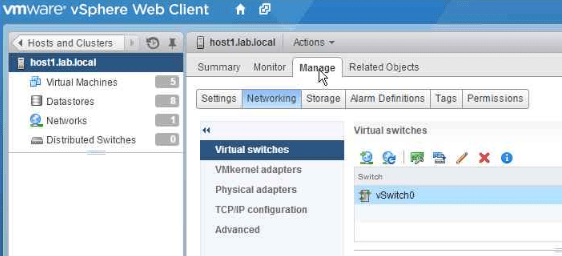
- Choose Manage, select Networking and then select VMkernel adapters.
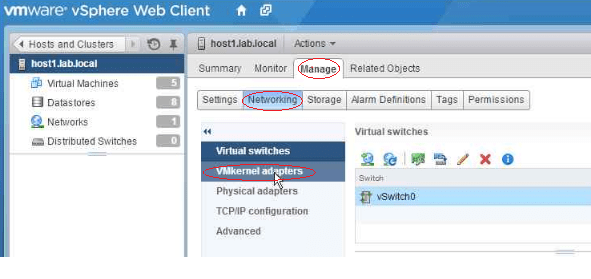
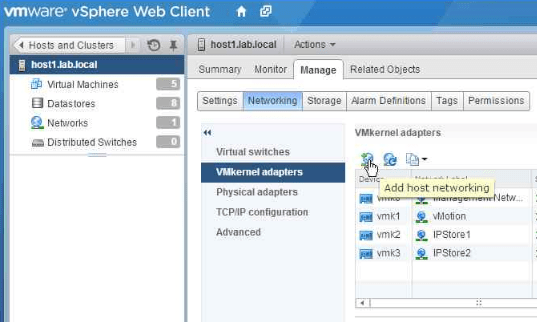
3. Click on Add host networking.
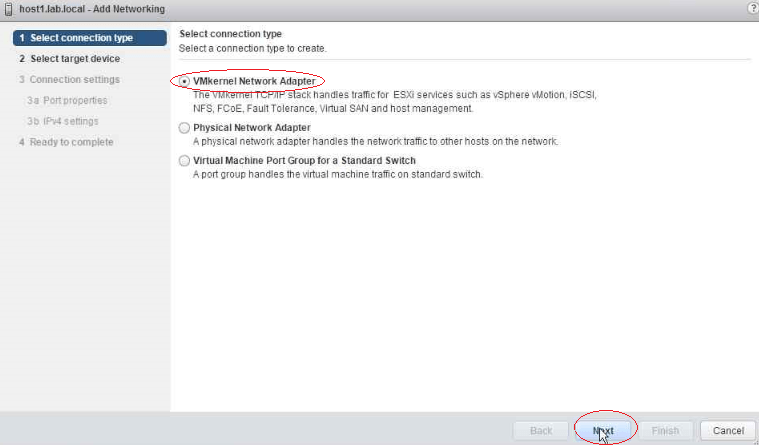
- On the Select Connection type page, select VMkernel Network Adapter and click Next
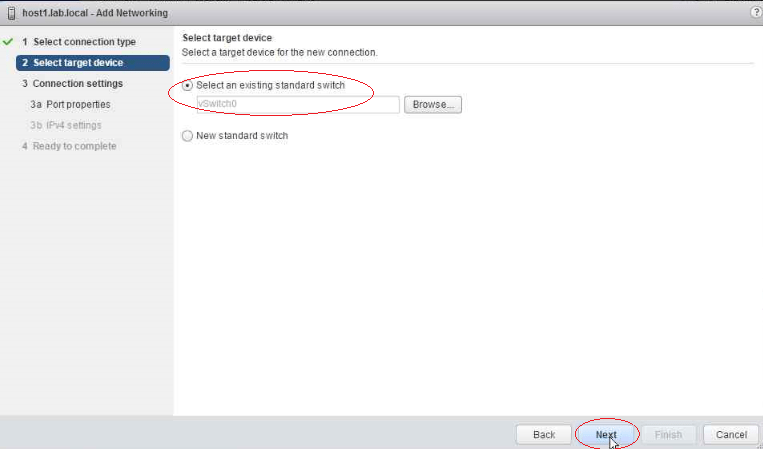
- On the Select target device page, select either an existing standard switch or a New vSphere standard switch. In this example I’m choosing an existing VSS called vSwitch0.
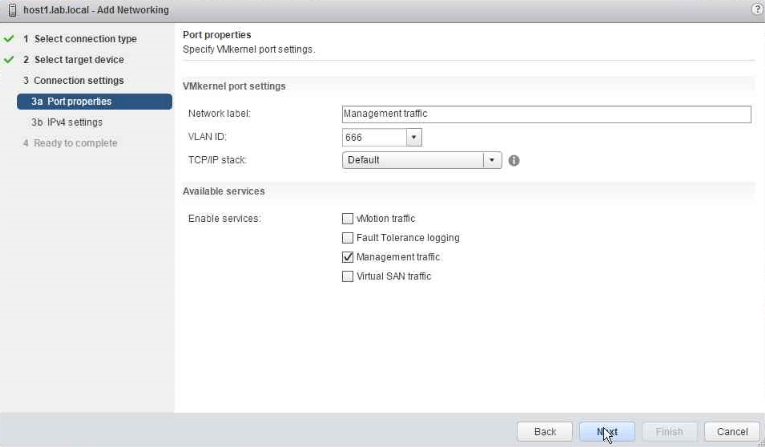
- On the Port properties page, configure the following settings:
Network label (name of vmk adapter): (for example: Management traffic)
VLAN ID: (for example: 666)
TCP/IP stack: (for example: Default)
Enable services: Management traffic
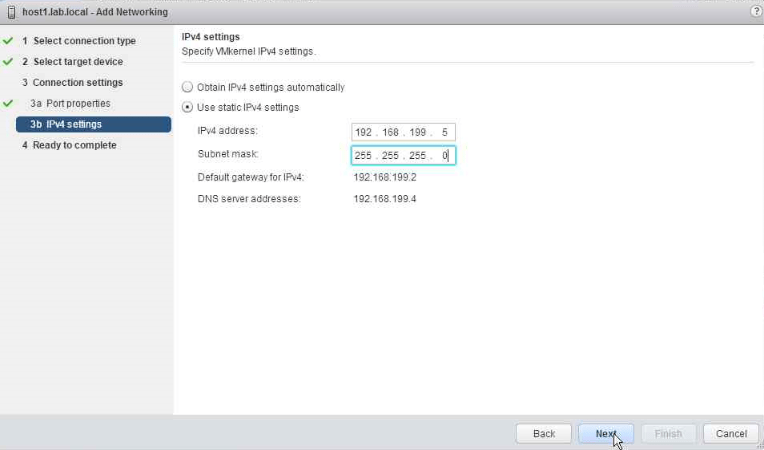
- On the IPv4 settings page, select an option for obtaining an IP address. For this example, I’ve chosen to use a static IP address of 168.199.5 and Subnet mask of 255.255.255.0
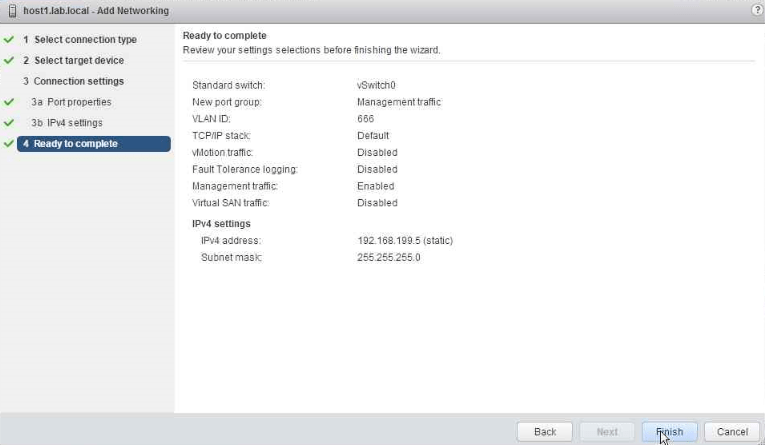
- On the Ready to complete page then review your setting selections and click on Finish
vSphere Cluster Size
I’ve pondered over this question before, “how big should I make my cluster”. At that point you have to take a step back and think about the tradeoffs with the potential impacts that your next decision is going to bring.
So you have a design decision: Should you design a vertical or horizontal vSphere HA cluster?
At this point you have some design choices to make. Let’s assume that you have an already established cluster of 5 nodes with HA and DRS enabled. There is money in the budget to buy additional servers to accommodate future growth.
There is a considerable amount of information in order for you to consider in order to make the most appropriate decision, such as cost, power, cooling, floor space and max cluster limitations to name a few. There are advantages and disadvantages to designing a vertical or horizontal cluster.
Scale-up cluster
| Advantage | Disadvantage |
| Managing fewer host reduces administrative cost | HA failover potential takes longer to complete |
| Less hardware to provide redundancy vice splitting the cluster in two and needing more host for failover | Need to be careful to stay within the cluster VM pert Host maximums. Potentially resulting in VMs not being restarted after a failure. |
| More cluster resources reserved for failure | |
| For DRS, fewer migration choices available to balance out the cluster | |
| Patching large clusters can take longer |
Scale-out cluster
| Advantage | Disadvantage |
| A host failure affects fewer VMs | Potential affects the maximum size that a VM can be configured |
| HA failover takes less time | More data center floor space |
| Fewer resources reserved for failover | Increase costs, i.e. power, cooling |
| Less of a concern with staying within the cluster VM per Host maximums | |
| For DRS, it provides a greater migration choice and more opportunities for a better workload balance |
On top of these advantages/disadvantages then you have to decide if your current design is meeting the demand of the business to achieve the performance, scalability and the return on investments. Gathering a current state assessment will aid the decision making process to guide you towards a design. Getting back to the scenario above it definitely depends on a multitude of factors, but if you can identify all of these different interdependencies. There is not enough information to make a decision up front, but you can start to formalize a game plan to get you in the right direction.
With these choices being taken into account, then one must decide whether you’re meeting the requirement of the business needs. I definitely enjoy making those decisions and figuring out the best possible solution available.
Useful resources
- There is a nice vSphere Cluster Sizing Calculator by @josh_odgers which allows you to do a quick calculation
- VMware vSphere Design 2nd Edition by Forbes Guthrie, Scott Lowe and Kendrick Coleman
- VMware Design Workshop course
 Digital4n6.me