
Enable VMware EVC by default on your new vSphere Clusters
If you don’t have a compelling reason to not enable EVC on a cluster, then I don’t see why you wouldn’t enable it. EVC allows you to future guard your cluster so that it allows you to introduce different CPU generations on a cluster.
There has been no evidence that EVC negatively impacts performance. But like with anything you should trust, but verify the application workload has the acceptable level of performance that is required.
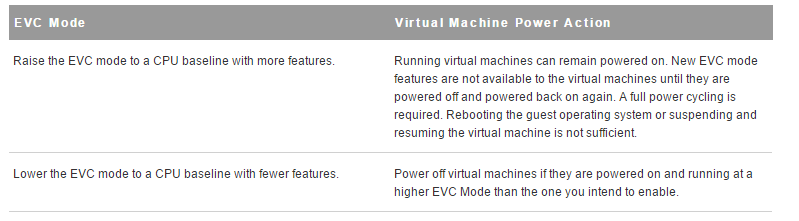
There are impacts as to whether you have enabled EVC on an already existing vSphere cluster with running VMs. There is no outage if you do decide to turn on EVC on an existing cluster, but running VMs will not be able to take advantage of new CPU features until the VM is powered off and powered back on again. The opposite will occur if you decide to lower the EVC on an already EVC enabled cluster so the VM will be running at a higher EVC mode than the one that was explicitly lowered to until the VM is powered off and powered back on.
References:
- VMware KB: EVC and CPU Compatibility FAQ (1005764):
- Derek Seaman’s Blog: How much does VMware EVC mode matter? Which one?:
- VMware Technical White Paper: Impact of Enhanced vMotion Compatibility on Application Perfromance:
- Frank Denneman’s Blog: Enhanced vMotion Compatibility:
 Digital4n6.me