
Enable VMware EVC by default on your new vSphere Clusters
If you don’t have a compelling reason to not enable EVC on a cluster, then I don’t see why you wouldn’t enable it. EVC allows you to future guard your cluster so that it allows you to introduce different CPU generations on a cluster.
There has been no evidence that EVC negatively impacts performance. But like with anything you should trust, but verify the application workload has the acceptable level of performance that is required.
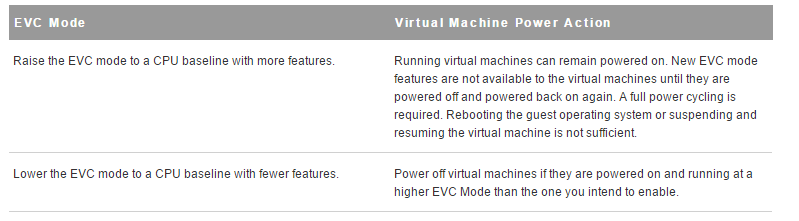
There are impacts as to whether you have enabled EVC on an already existing vSphere cluster with running VMs. There is no outage if you do decide to turn on EVC on an existing cluster, but running VMs will not be able to take advantage of new CPU features until the VM is powered off and powered back on again. The opposite will occur if you decide to lower the EVC on an already EVC enabled cluster so the VM will be running at a higher EVC mode than the one that was explicitly lowered to until the VM is powered off and powered back on.
References:
- VMware KB: EVC and CPU Compatibility FAQ (1005764):
- Derek Seaman’s Blog: How much does VMware EVC mode matter? Which one?:
- VMware Technical White Paper: Impact of Enhanced vMotion Compatibility on Application Perfromance:
- Frank Denneman’s Blog: Enhanced vMotion Compatibility:
Using the Socratic Approach to Problem Solving
Using the Socratic Approach to Problem Solving
Applying a Socratic approach to problem solving can help to identify gaps and improve problem solving. It can help to spark new insights to produce further knowledge of the problematic area of interest. This approach focuses on asking a person a series of open-ended questions to help promote reflection.
Step 1: Identify the elements of the problem, issue or question
Things you may do in this step may include:
- Breaking the problem down into pieces, elements or components.
- Look for missing information or gaps in what you know.
- Make note of the information that you don’t have or can’t find
Questions you may ask in this step include:
- What is the problem you’re trying to solve?
- What information is missing?
- Is it possible to get the information that I don’t have?
Step 2: Analyze/Define/Frame the problem, issue or question
Things you may do in this step may include:
- Decide which pieces of information are important
- Avoid premature solutions
- Identify the complexities of the problem
Questions you may ask in this step include:
- What am I trying to solve?
- Is the information so far gathered relevant to the problem?
- What are all of the possible causes of the problem?
Step 3: Consider solutions, responses or answers
Things you may do in this step may include:
- Analyze possible solutions
- Check the implications of each possible solution
Questions you may ask in this step include:
- Are there any other possible solutions?
- What might be the consequences of these solutions?
Step 4: Choose an actual solution to implement
Things you may do in this step may:
- Question your choice of solution
- Consider the problems that may result from your choice
Questions you may ask in this step include:
- Why do I prefer this solution as compared to the others?
- What are the possible risks of this solution?
- How is this solution supported by the facts so far?
Step 5: Implement your choice
- Monitor the progress of the implementation
Step 6: Evaluate the results
- Did I solve the problem?
This is just one way to go about solving a problem when you get called into a situation where you need to solve a problem. There are other ways to skin the cat but this one is easy enough to follow and can provide some fruitful information to help solve the problem
Ethical Aspects of Monitoring
Nowadays it’s common knowledge that when you log onto a corporate network that your activities can and will be monitored. Technology has created new possibilities for human interaction and monitoring employees has become a necessity in order to maintain legal, regulatory, security and performance. A written code of ethics and providing the training will help employees understand what is expected.
The organization must adapt the features in technology to suit their community, norms, and culture of the organizations while still meeting any legal requirements under the law. Some sectors have a requirement to provide a continuous monitoring systems that is constantly monitoring the corporate network. So an “it depends” answer would have to apply to the question of the best method of obtaining the proper permissions to monitor user actions.
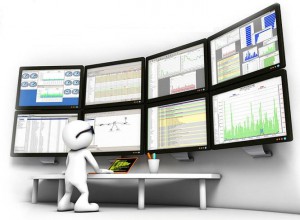
Monitoring user actions of employees’ behavior will continue to be a controversial topic. To ensure the buy-in from the employees then every level of management and non-management employees must understand the ethical implications of the decision to monitor as it relates to their personal and professional values.
The resounding threats that are present throughout an organization requires that it be monitored properly to ensure that the capabilities are the to ensure the bad guys are not getting access to corporate information.
I’m not a security professional by trade, but I definitely understand the challenges that the security personnel are concerned with so I can identify. So I think this makes me a better architect by understanding the key areas in which a system gets deployed.
Security Events, Baselines, and Anomalies
Monitoring the IT systems is part of the due diligence that most organizations are familiar and have well established practice when it comes to the procedures and tools to use. By observing anomalies from already established baselines then incident responders can better generate the breadcrumb for the root cause. Capturing the evidence to put the puzzle pieces together is a vital element of continuous monitoring.
Security baselines align the responsibility to be shared outside of the IT management area so that business management has input. This in turn should make the security controls which are used to be more appropriate to the business needs and will provide a senior level sign-off that the security standards are enforced throughout the organization. The idea of having a basic mandatory level of information security will allow the organization to provide the layers of security to establish a defense in depth layered approach to the security framework.
These security baselines, which should be validated early on in the development of a new system, will drive the continuous monitoring and irregularities in usability trends. When an irregularity is determined, then a closer look needs to then take place in order to determine whether the event is a true incident or a potential false positive.
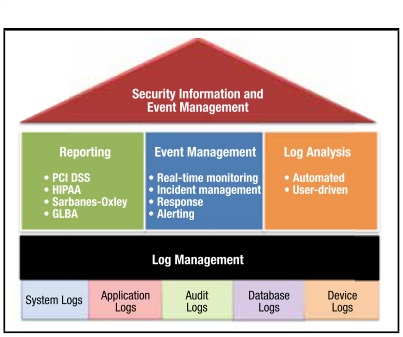
A Security Information and Event Management (SIEM) solution provides real-time analysis of security alerts generated by applications and network hardware. These reports from the SIEM solutions can be used to establish a baseline and to monitor for compliance purposes. The log files generated can provide the resource when it comes to troubleshooting and supporting other incidents. With the aid of a log management solution that can collect logs from all sources and organize these logs in a centralized, scalable manner, then it allows the responders to paint the picture of what is causing the irregular behavior from the established baselines.
The amount of activity that these log files generate is enormous. The presence of logs in all environments allows thorough tracking and analysis if something does go wrong, which can then be used to determine the cause of the compromise.
Enterprise SysLog systems can be used to provide data aggregation from many different sources, including network, security, servers, databases and applications to provide the ability to basically monitor everything. By aggregating these logs, then it helps to avoid missing subtle but important ones. While having the logs centralized then a correlation to look for common attributes and link events together into meaningful bundles of information. Also, the automated analysis of correlated events can produce more substantial and detailed alerts.
Ultimately, utilizing an enterprise syslog tool to parse these vast amounts of logs can provide the IT department with a set of automatic eyes in the sky to sift through all of the data and help to identify what is most important to have a prioritized response. A trend scenario can be put on a dashboard to have a visualization point of view to begin tackling those events in a systematic approach. Granted a set of human eyes will have to validate all of these findings.
iSCSI Security in VMware
Fibre channel seems to be losing its popularity and more people are turning to iSCSI as the block storage protocol of choice. If you don’t already have an FC fabric then why introduce that into your design now. So when choosing to use iSCSI for storage connectivity or any other storage protocol then you’ll have to take security into consideration when performing an implementation.
Security is a pillar of infrastructure design qualities in which every system should be properly designed from its inception. Depending on the data or system you’re trying to protect then the protection mechanism should be proportion to the criticality or importance to the organization. To secure your SAN you should:
- Assess configurations
- Test secure mechanism effectiveness
- Identify holes
- Quantify risks
- Implement practical security solutions for high risk exposures
The EMC article titled “Building Secure SANs” has a nice table illustrating the different security categories and the mechanism to protect it. I’ll just should the IP SAN section:
| Security Category | IP SAN Mechanisms | VMware Supported |
| Availability | QoS | Yes, also SIOC and NIOC |
| Authentication | CHAP
KBR RADIUS TACACS+ Kerberos SRP |
Yes
No No No No No |
| Authorization | iSCN
LUN Masking VLAN Tagging Port controls |
No
Yes Yes Yes |
| Auditing | ACL
SSH SSL |
Yes |
| Encryption | IPSec
In-transit Algorithms At-rest Algorithms |
No |
| Integrity | IPSec (AH)
MD5 hash SHA-1 hash |
No |
Security should be used in a multi prong approach with protection at multiple levels. By enforcing good security standards and principles you can have a network that can help in mitigating your risks to vulnerabilities in your iSCSI storage.
References:
- Building Secure SANs: https://www.emc.com/collateral/hardware/technical-documentation/h8082-building-secure-sans-tb.pdf
- VMware Documentation: Protecting an iSCSI SAN: https://pubs.vmware.com/vsphere-60/index.jsp#com.vmware.vcli.examples.doc/cli_manage_iscsi_storage.7.3.html
- VMware Best Practices for Running VMware vSphere on iSCSI: http://www.vmware.com/files/pdf/iSCSI_design_deploy.pdf
Requirement Elicitation
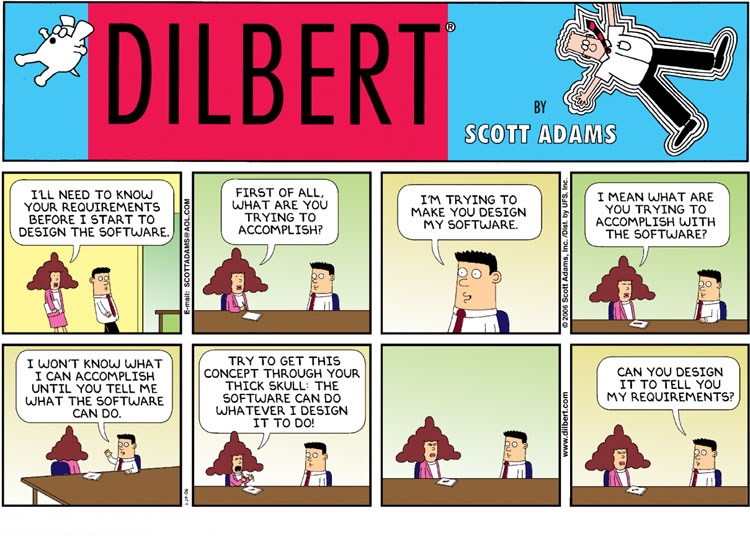
Some of the challenges associated with requirement gathering or elicitation happens in the development life cycle. During the beginning stages, it is of the utmost importance to get a good grasp of the requirements. Getting the requirements wrong or not properly captured can set a project up for failure from the beginning.
This YouTube video is funny because some of us have been there: https://www.youtube.com/watch?v=lXNu0VBVCUc
Requirements gathering is all about determining the needs of the stakeholders to solve a problem or achieve an objective. Once the needs have been identified, then it’s a matter of succinctly identifying the specific requirements while minimizing any assumptions. Sometimes an iterative approach helps the process by continuously checking in with the stakeholders throughout the project to determine if the progress is meeting their requirements. The amount of iteration depends on the complexity of the project.
Requirements can be broken down into functional and non-functional requirements. A functional requirement specifies what the system should do. A non-functional requirement specifies how the system should behave. A method for requirement prioritization is the MoSCoW technique in which you break up the requirements into:
- MUST (M)
- SHOULD (S)
- COULD (C)
- WON’T or WOULD ( W )
This is a good step to help prioritize those requirements so that you know what to focus on the most, which is the must haves. On top of the requirements you also can’t forget the assumptions, constraints, and risks.
Resources:
- RFC to Indicate Requirement Levels: http://www.ietf.org/rfc/rfc2119.txt
- Functional vs Non-Functional Requirements: http://communities.vmware.com/docs/DOC-17409
- BABOK Key Concepts: http://www.iiba.org/babok-guide/babok-guide-v2/babok-guide-online/chapter-one-introduction/1-3-key-concepts.aspx
Working in a Virtual Team
In this sense, a virtual team is one that is made up of people in different physical locations. I’ve worked on different projects that required the use of virtual teams. I’ve had a love/hate relationship with them in the past. Working in a team is not easy in general, so working in a virtual team raises the level of difficulty one notch up. By no means is it impossible, but it takes some work to make it successful.

One of the challenges is deciding on the best use of the technology platform that works best for everyone. The use of mobile technology makes it a menu of choices to pick from. Some people argue that the lack of face-to-face interaction is lost, but to that I say WebEx video, Skype video and FaceTime can take care of that. The other challenge is if the team is spread out into different time zones then that the scheduling of meetings becomes an issue.
The challenge of working in a virtual team can be an opportunity to bring in a diverse set of viewpoints and experiences that team members can contribute. I believe that as long as you have good communication skills, then working in a team, whether traditional or virtual team will not be a problem.
This HBR article gets a lot of points right in relation to virtual teams: https://hbr.org/2014/12/getting-virtual-teams-right
IT Risk Mitigation
Every IT project brings some level of risk. Risk mitigation is about understanding those risks that can impact the objectives of the project. Once that’s identified, then you need to take the appropriate actions to minimize the risks to a defined acceptable level to the customer. Taking those deliberate actions to shift the odds in your favor, thereby reducing the odds of bad outcomes.

At times risk management is an active process that often requires a large degree of judgement due to insufficient data. The architect has to make certain assumptions about the future. Technology is a source of risk and its often due to the unintended consequences. For this reason, you must validate that your mitigation is resolving the identified risk.
Risk is a function of the likelihood of a given threat-source’s exercising a particular potential vulnerability and the resulting impact of that adverse event on the project.
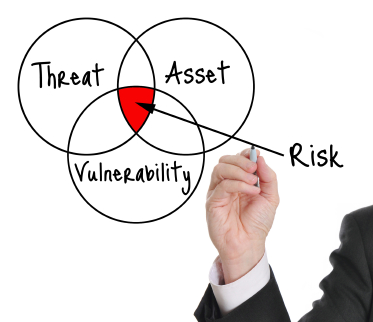
So, in order to effectively manage the risk, then one must identify the risk, assess the risk, respond to the risk and then monitor the risk.
I was in a project meeting recently and the project manager was asked what were some of the risk identified. The PM responded with none and the whole room sat silent for a few seconds. Then he went into his risk log list and the whole room chuckled a bit.
Resources:
- NIST Special Publication 800-30 Rev 1: http://csrc.nist.gov/publications/nistpubs/800-30-rev1/sp800_30_r1.pdf
VCDX No Troubleshooting Scenario
I just read the update from the VCDX program that they’re removing the troubleshooting scenario from all defenses. While I was looking forward to trying to do some on the spot troubleshooting, I’m glad that there is more time now dedicated to the design scenario.
I’m planning on targeting 2016 to give the VCDX-DCV certification a try and not having to work through an already stressful situation by working through a troubleshooting problem is going to alleviate some of that stress. Granted the troubleshooting scenario is only 15 minutes in length, now that time is added to the design scenario problem posed by the panelists.

So the breakdown now will be for all tracks:
- Orally defend the submitted design (75 minutes)
- Work through a design problem posed by the panelists, in the format of an oral discussion (45 minutes instead of the previous 30 mins)
Not that this makes the certification easier to achieve by any means. I’m glad that the VCDX program has made this information available well ahead of the 2016 dates so that those that are preparing now can adjust their studying strategies.
I’m looking forward to the challenging and learning experience that will come.
Resources:
- 2016 VCDX Defense Improvements: https://blogs.vmware.com/education/2015/11/2016-vcdx-defense-improvements.html
AWS Regions and Availability Zones
Every IT architect strives to deliver an optimized and cost effective solution to their customer. Therefore, they must be able to explain and understand the different options that a customer has to then assist them in choosing the best option possible taking the trade-offs into account. There is a mutual partnership relationship between the architect and the customer that is ongoing in order to produce a quality output deliverable.
Amazon AWS infrastructure is broken up by regions and availability zones. They continue to expand their infrastructure constantly as their business grows. So what is a region, a region is a named set of AWS resources in the same separate geographic area. AWS provides you with a choice of different regions around the world in order to help customers meet their requirements. Each region is completely isolated from the other regions.
There are only a set number of available regions to choose from when but as the customers grow, then AWS will continue to provide the infrastructure that meets the global requirements. In North America AWS has 3 regions to choose from and a GovCloud region:
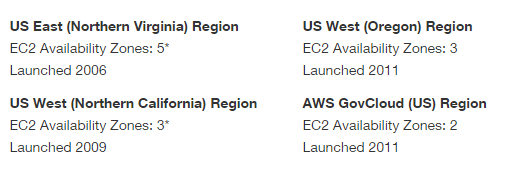
Inside of these regions, there are Availability Zones. These are basically AWS data centers within these regions that are connected to each AZ in the region via low latency links.
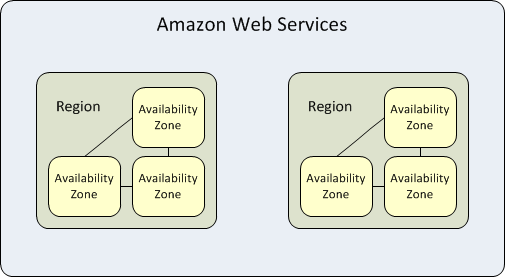
Availability zones allows you to architect your applications to be as resilient as possible by separating them out as failure domains so that there is not a single point of failure. As with all architects, we must design architectures that assumes that things will fail.
With the implementation of Auto-Scaling, ELBs and multiple Availability Zones then you can build a reliable architecture that takes only minutes to setup instead of days and weeks. I’ll go over Auto-Scaling and ELBs on a separate post.
Resources:
- Regions and Availability Zones: http://docs.aws.amazon.com/AWSEC2/latest/UserGuide/using-regions-availability-zones.html
- AWS Global Infrastructure: http://aws.amazon.com/about-aws/global-infrastructure/
 Digital4n6.me