
Resource pools, child pools, and who gets what…
I know there have been numerous blog posting on this topic already which are all very good, but this is mainly for my own understanding as I try to understand this topic a bit further.
So what are resource pools?
They are a logical abstraction for management so you can delegate control over the resources of a host (or a cluster). They can be grouped into hierarchies and used to progressively segment out accessible CPU and memory resources.
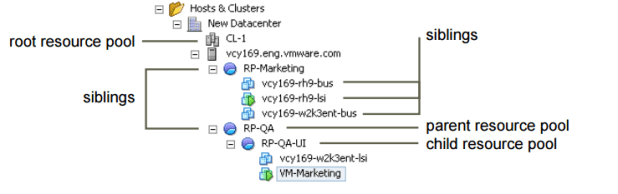
Resource pools use a construct called shares to deal with possible contention (noisy neighbor syndrome)
| Setting | CPU share values | Memory share values |
| High | 2000 shares per vCPU | 20 shares per megabyte of configured VM memory |
| Normal | 1000 shares per vCPU | 10 shares per megabyte of configure VM memory |
| Low | 500 shares per vCPU | 5 shares per megabyte of configured VM memory |
*Taken from the 5.5 vSphere Resource Management document
My biggest issue with even getting into any contention issues is why would you architect a design that has the possibility to have contention if you can avoid it. I understand that a good design takes into account for the worst case scenario in which all VMs would be running at 100% of provisioned resources, therefore possibly generating an over-commitment issue with potential contention but that’s when you go to the business to request more funds for more resources. I know it’s the one of the benefits of virtualization that you can do this, but should you rely on it?.. It’s also a comfort level of over allocation in which the level depends on the individual architect. Keep to the rule of protecting the workload and I don’t see an issue with this. I keep the worst case scenario in mind, but I don’t ever want to get there, but this is more of a rant than anything else.
Frank Denneman(@FrankDenneman), Rawlinson Rivera(@PunchingClouds), Duncan Epping(@DuncanYB) and Chris Wahl(@ChrisWahl) have already set us straight on the impacts of using resource pools incorrectly and the best ways to most efficiently use RPs.
The main takeaways of resource pools are:
- Don’t use them as folders for VMs
- Don’t have VMs on the same level as resource pools without understanding the impacts
- If VMs are added to the resource pools after the shares have been set, then you’ll need to update those share values
- Don’t go over eight (8) levels deep [RP limitation; and why would you]
Additional Resources:
Chris Wahl: Understanding Resource Pools in VMware vSphere
Frank Denneman and Rawlinson Rivera: VMworld 2012 Session VSP1683: VMware vSphere Cluster Resource Pools Best Practices
Duncan Epping: Shares set on Resource Pools
 Digital4n6.me
Question. Is there any performance impact when vm’s reside in Resource Pools and/or child pools at the ‘Normal’ share value with no reservations, no limits, and expandable reservations enabled?
I ask because I came across a user who had grouped all vm’s in Resource Pools to ‘organize’…I know. But I’m having a difficult time explaining why and if this could cause a resource issue when all the pools are configured the same and there are no shares or limits set on anything.
Thanks!
Chris,
There will be no performance impact with this setup initially. But once there is contention for available resources, then that’s when the share values will begin to get applied and a noticeable impact will be seen. They need to be careful with this setup as many times the resource pools are setup once and never again revisited.